Posts tagged "Agent-runners"
-
OpenAI’s GPT-6.1 Terra model is now available through Netlify’s AI Gateway and Agent Runners with zero configuration required.
Use the OpenAI SDK directly in your Netlify Functions without managing API keys or authentication. AI Gateway handles everything automatically. Here’s an example using GPT-6.1 Terra with the Responses API:
import OpenAI from 'openai';export default async () => {const openai = new OpenAI();const response = await openai.responses.create({model: 'gpt-6.1-terra',input: 'Give a concise explanation of how AI works.',});return Response.json(response);};GPT-6.1 Terra is also available across Scheduled Functions, Background Functions, and Edge Functions. You get automatic access to Netlify’s caching, rate limiting, and authentication infrastructure.
Learn more in the AI Gateway documentation and Agent Runners documentation.
-
MiniMax’s M3.1 Flash model is now available through Netlify’s AI Gateway and Agent Runners with zero configuration required.
Use the OpenRouter SDK directly in your Netlify Functions without managing API keys or authentication. AI Gateway handles everything automatically. Here’s an example using MiniMax M3.1 Flash:
import { OpenRouter } from '@openrouter/sdk';export default async () => {const client = new OpenRouter();const response = await client.chat.send({chatRequest: {model: 'minimax/minimax-m3.1-flash',messages: [{ role: 'user', content: 'How can AI improve my coding?' }],maxTokens: 400,},});return Response.json(response);};MiniMax M3.1 Flash is also available across Scheduled Functions, Background Functions, and Edge Functions. You get automatic access to Netlify’s caching, rate limiting, and authentication infrastructure.
Learn more in the AI Gateway documentation and Agent Runners documentation.
-
TanStack Start is now 1.0, and Start apps deploy on Netlify. SSR, server routes, server functions, and middleware run on Netlify Functions. It’s also what new Agent Runners projects start with by default.
Start a new app
Deploy the official template, or generate your own:
npx create-tsrouter-app@latest --template file-router --add-ons tanchat,netlifyDeploy an existing app
Install the Netlify plugin:
npm install -D @netlify/vite-plugin-tanstack-startThen add it to
vite.config.tsaftertanstackStart():import { defineConfig } from 'vite'import { tanstackStart } from '@tanstack/react-start/plugin/vite'import netlify from '@netlify/vite-plugin-tanstack-start'export default defineConfig({plugins: [tanstackStart(), netlify()],})Add a
netlify.tomlwith your build settings:[build]command = "vite build"publish = "dist/client"Develop locally against the real platform
The plugin emulates Netlify in your dev server, so you can build against the same primitives you’ll use in production, without the Netlify CLI:
- Serverless functions and edge functions
- Blobs and Netlify Database
- Cache API and Image CDN
- Redirects, rewrites, and headers
- Environment variables
- AI Gateway
Start with Agent Runners
New projects you start with Agent Runners use TanStack Start 1.0 unless another framework is specified.
-
Google’s Gemini 4 Argon model is now available through Netlify’s AI Gateway and Agent Runners with zero configuration required.
Use the Google GenAI SDK directly in your Netlify Functions without managing API keys or authentication. The AI Gateway handles everything automatically. Here’s an example using the Gemini 4 Argon model:
import { GoogleGenAI } from '@google/genai';export default async () => {const ai = new GoogleGenAI({});const response = await ai.models.generateContent({model: 'gemini-4-argon',contents: 'How can AI improve my coding?'});return Response.json(response);};Gemini 4 Argon is available for all Function types and Agent Runners. You get automatic access to Netlify’s caching, rate limiting, and authentication infrastructure.
Learn more in the AI Gateway documentation and Agent Runners documentation.
-
Mistral AI’s Mistral Large 4 model is now available in Netlify Agent Runners. With a 524K-token context window, it’s built for agentic coding and long-context work, making it a good fit for multi-step tasks across larger codebases.
Select it from the model picker to try it today. Learn more in docs.
-
Anthropic’s Claude Haiku 5.5 model is now available through Netlify’s AI Gateway and Agent Runners with zero configuration required.
Use the Anthropic SDK directly in your Netlify Functions without managing API keys or authentication. AI Gateway handles everything automatically. Here’s an example using Claude Haiku 5.5 with the Messages API:
import Anthropic from '@anthropic-ai/sdk';export default async () => {const anthropic = new Anthropic();const response = await anthropic.messages.create({model: 'claude-haiku-5-5',max_tokens: 1024,messages: [{ role: 'user', content: 'Give a concise explanation of how AI works.' }],});return Response.json(response);};Claude Haiku 5.5 is also available across Scheduled Functions, Background Functions, and Edge Functions. You get automatic access to Netlify’s caching, rate limiting, and authentication infrastructure.
Learn more in the AI Gateway documentation and Agent Runners documentation.
-
You can now add comments to individual lines in the diff on the Code tab of Agent Runners, so you can give your agent precise feedback on the code it generated.
Previously, asking for a fix meant describing where the problem was in your prompt, such as naming the file, quoting the code, or explaining which function you meant.
Now you can pinpoint exactly where you want changes. Open the Code tab for an agent run, select the + next to a line in the diff, and leave a comment about what you want changed. Your comments are sent along with your next prompt, so the agent knows exactly which code lines you’re referring to.
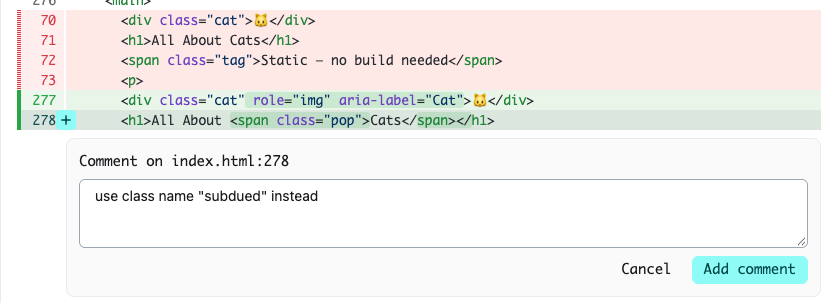
This makes follow-up prompts more useful when you want to:
- Correct a specific bug or edge case without rewriting the whole request
- Ask for a different approach in one part of a change while keeping the rest
- Flag naming, styling, or structure issues right where they appear
- Leave feedback on several spots across multiple files in a single follow-up run
Try it on your next agent run, or learn more about making changes with Agent Runners.
-
Every site created with Agent Runners now includes Open Graph tags. When you share a link to your site, it shows up as a proper preview instead of a bare URL.
Social media sites and messaging apps read Open Graph tags to build link previews. Now, when you or your visitors share a site you created with Agent Runners, the preview includes a screenshot of the site, its title, and a description. That makes your site easier to recognize, more inviting to click, and look better than ever from the moment you share it.
This is available on all public sites created with Agent Runners. You don’t need to do anything to turn it on.
Learn more about Agent Runners in the Agent Runners docs.
-
OpenAI’s GPT-6.1 Sol model is now available through Netlify’s AI Gateway and Agent Runners with zero configuration required.
Use the OpenAI SDK directly in your Netlify Functions without managing API keys or authentication. AI Gateway handles everything automatically. Here’s an example using GPT-6.1 Sol with the Responses API:
import OpenAI from 'openai';export default async () => {const openai = new OpenAI();const response = await openai.responses.create({model: 'gpt-6.1-sol',input: 'Give a concise explanation of how AI works.',});return Response.json(response);};GPT-6.1 Sol is also available across Scheduled Functions, Background Functions, and Edge Functions. You get automatic access to Netlify’s caching, rate limiting, and authentication infrastructure.
Learn more in the AI Gateway documentation and Agent Runners documentation.